Where repetition shows up
- scripts rerunning the same task
- agents revisiting the same request patterns
- cron jobs repeating on schedule
- local testing replaying identical calls
- reusable AI workflows creating stable request structure
 ← Back to home
AI Optimizer is a local caching proxy for repeat-heavy AI workflows. When a script, agent, or scheduled job repeats an identical request inside your chosen TTL, the response is served from your machine instead of being sent upstream again.
Change one base URL. Set a TTL that fits the workflow. Then watch the hit counter in local stats and the browser popup so you can prove the savings instead of guessing.
A lot of AI usage is not one-off chatting. It is repeat-heavy operational work that quietly sends the same or nearly identical requests again and again.
Even when a workflow feels dynamic, many requests are exact repeats at the API level. When that happens, paying full price every time is waste.
If a scheduled job runs every 15 minutes, that is 96 runs per day and 2,880 runs per month. When those requests are identical, repeat cost adds up fast.
The proof lane uses a deterministic AI request that sends the same known input through AI Optimizer and expects the same known response: CACHE_TEST_OK.
The goal is not to chase a vanity number. It is to make one repeatable workflow visible enough that you can tell where the first request went and where the repeated one was served.
Pick one script, agent, or scheduled job you already run and point its OpenAI- or Anthropic-compatible base URL at AI Optimizer.
Set the cache window intentionally so the workflow has a fair chance to repeat inside the period you actually care about.
The first request proves the upstream path works. The second identical request is the one that tests whether the result can be served locally instead.
The stricter target is the browser popup plus a simple curl /stats call. The currently staged support visuals are the popup and the local dashboard, which is honest today but not the same thing as the cleaner popup-plus-terminal pair.
This page is built around deterministic repeat requests, a chosen TTL, visible cache-hit stats, and a browser popup that shows the running totals locally. The point is not one magic number. The point is that repeat-heavy workflows can be tested, verified, and inspected on your machine.
The screenshots staged here today are the popup and the app dashboard. If we want the stricter matched pair later, the next capture adds a true terminal curl /stats still instead of pretending the dashboard image already fills that role.
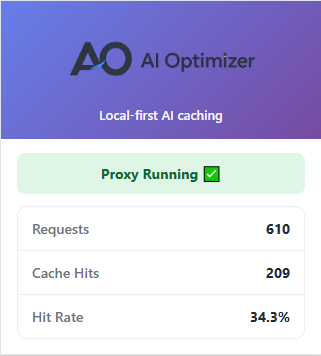
Local stats and the browser popup make cache hits visible as they happen, so you can inspect real repeat behavior instead of inferring it from billing later.
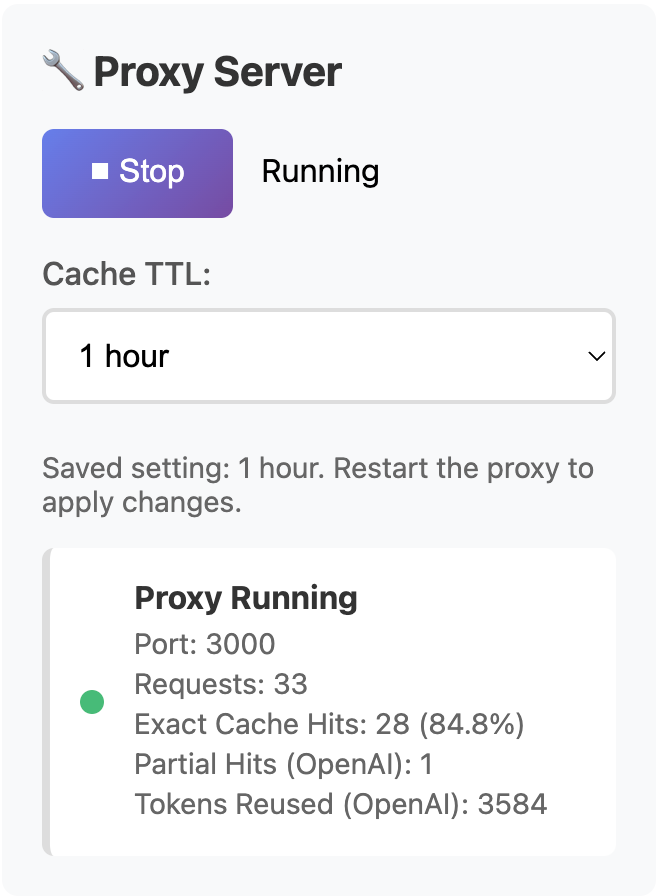
The app dashboard keeps exact local hits, partial provider-side reuse, and reused tokens visible in one place, so the proof lane stays inspectable without leaning on stale scheduled-run screenshots. It is honest support for the current staged bundle, while a true terminal curl /stats still remains the stricter companion if we decide to capture it.
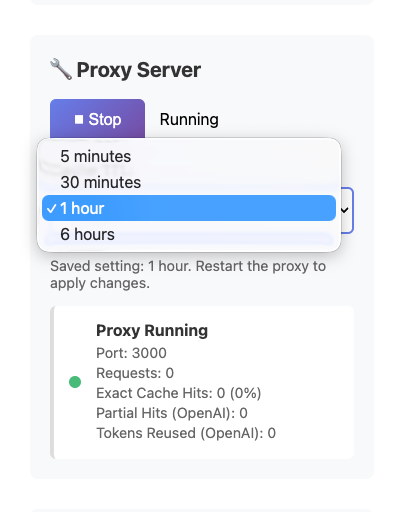
The cache window is chosen to fit the workflow instead of relying on provider defaults or vague behavior, which makes the proof method portable across different repeat-heavy tasks.
Fair question. OpenAI, Anthropic, and Google Gemini all have provider-side reuse or caching behavior in some lanes, but that solves a different problem than exact repeated-request caching for repeat-heavy local workflows.
Provider-side caching doesn’t solve every repeat-heavy workflow. AI Optimizer is for the workflows where exact repeated local requests, chosen TTL windows, and visible proof still matter.
AI Optimizer is strongest where repeated AI work is already part of normal operations.
Rerun the same prompts and tasks without paying full price every time.
Reduce waste from repeated agent loops, retries, and recurring reasoning patterns.
Match TTL to scheduled jobs and turn repeat-heavy runs into measurable cache hits.
Cut repeat cost in recurring background workflows and operational pipelines.
Support repeat-heavy testing, prompt refinement, and local AI-assisted development.
Reduce waste in standardized AI tasks like review, scaffolding, tests, and setup.
If you want fast proof, start with a workflow that already repeats the same structure often enough to create a clean before-and-after result.
Recurring cron jobs, digests, and background summaries are strong first tests because the request shape is often stable and the repeat timing is easy to match with TTL.
Agents that revisit the same setup, evaluation, or review path can create repeatable exact requests when the prompt structure stays controlled.
Local development runs, QA checks, and repeated prompt tests are ideal for proving cache hits quickly because you can intentionally replay the same request on demand.
Clean cache proof depends on repeatability. If too many variables change between runs, you learn less from the result.
AI Optimizer is not magic. It is strongest in a narrow, provable lane.
It works best when requests are truly repeated, when the workflow runs often enough to make those repeats meaningful, and when you want visible local proof instead of hoping the economics work out.
Simple operational flow. No theory exercise required.
Use AI Optimizer as the local endpoint for OpenAI- or Anthropic-compatible requests.
Scripts, agents, cron jobs, and automations keep working as usual.
When the same request appears again, AI Optimizer serves the cached result locally.
Pick one script or cron job you already run. One base URL change, one TTL, one visible cache hit.
Start with the 14-day free trial. If it proves useful in one real workflow, AI Optimizer is $4.99 USD/month after trial.
OPENAI_BASE_URL=http://localhost:3000/v1